
You have an app idea – Develop and release it fast vs. considering all aspects to make it a successful launch

When you check Appstore, you see many nicely designed apps, with many active users. Behind those few apps visible of the Appstore, there are hundreds of thousand of other apps, almost invisible to the users. You may come across them when you are searching for something (maybe for your idea for an app).

In general 80% of the app can be completed with only 20% of the effort, but the remaining 20% is making the difference. Many developers are not being determined to complete the app to the end and release the app just to tick the task. 

As most of the tasks, many details should be taken care for mobile apps; like the sounds, the colors / graphics, the animations, the onboarding process, steps to take the user to purchase or keep the interest of the users live. Besides these, there are tasks like beta tests with real users, getting feedbacks and fine-tuning the app, or marketing issues to be able to come out of the app mess in the store. 

It’s not a short journey, but the last mile is making the difference. Don’t release the app with a working proof of concept of your great idea.
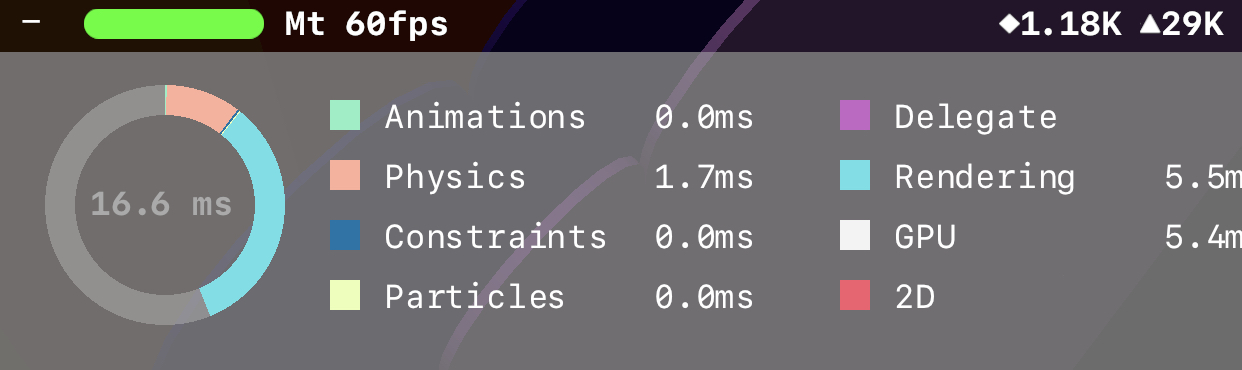
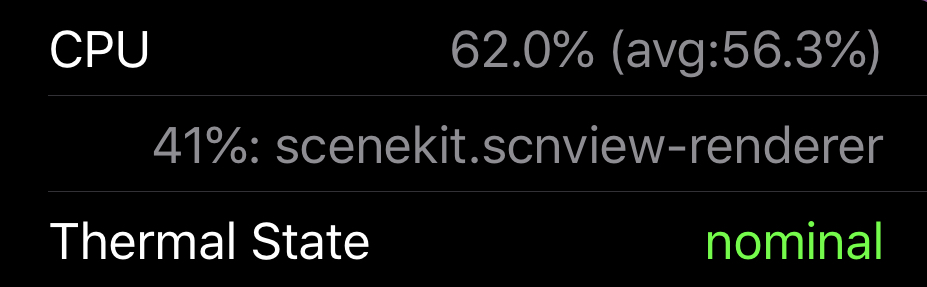
Few pointers on improving SceneKit performance

SceneKit is powerful and it is not that hard to create 3D games with it. Unless being careful it is also quite easy to have performance problems, especially for the older generation devices.

SceneKit consumes more resources with increasing node (◆) & polygon (▲) numbers, or with more detail on lighting, depth of field effects and transparency and blur effects.

Here are a couple things to check to improve SceneKit performance:

  • Enable SCNView.showStatistics setting for the debug build and check the number of nodes and triangles. Remember, lowering these numbers will help you.
  • More details to your geometries adds more polygons to the scene. Decreasing details to a level which is acceptable visually too, will improve the performance.
  • Consider using less detail for far objects, as it won’t really be visible to the camera. Have multiple versions of your geometry for different distance and provide them to SceneKit with SCNGeometry.levelsOfDetail.
  • Consider disabling SCNCamera depthOfField.

You may also consider to implement some debug overlay view (or log file) to display the CPU usage, top resource heavy thread or CPU thermal state, to be able to observe performance on the user devices during beta testing.

As the last resort, you may even consider decreasing the frame rate (if it is visually acceptable) for the low performance devices (SCNView.preferredFramesPerSecond). You can periodically monitor the CPU overhead and take this action for troubled devices.

Enjoy your game

In-app Search

If you are into adding search functionality to your app, make sure you provide following capabilities:

  • “Best Match” section (for category-based grouped results, like Spotify)
  • Result highlighting
  • “Did you mean” (DYM)
  • Auto complete
  • “Notify me for new results” (percolate query)
  • Placeholder content suggestions for the initial empty search screen
  • Feed users’ interaction with search results events into score calculation
Design a site like this with WordPress.com
Get started